Key takeaways
- Google does not score “UX” as a global metric: it measures three specific signals, the Core Web Vitals (LCP, INP, CLS), alongside indirect satisfaction signals.
- The UX work that actually affects rankings comes down to three areas: performance, mobile and information architecture.
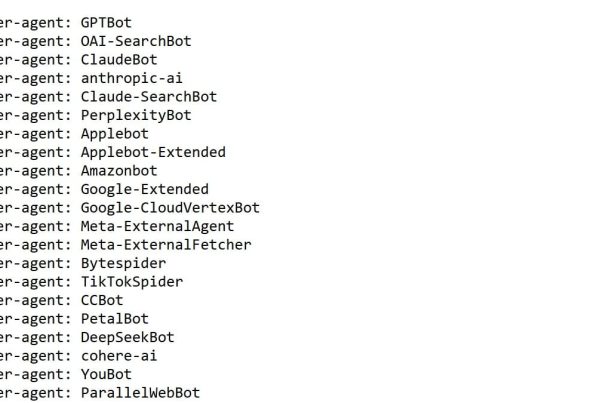
- An interface choice Google tolerates can erase you from AI answers: GPTBot, ClaudeBot and PerplexityBot do not execute JavaScript and only read raw HTML.
- SXO is not a new discipline: user experience has always been a pillar of search, with a third channel to feed from now on.
User experience affects your rankings through three signals Google measures directly, and now conditions a second channel: citation by generative AI. A page that frustrates a human is often unreadable for a bot.
Is UX a ranking factor in 2026?
Yes, though not in the form most articles describe. Google calculates no global “UX score”. It measures three specific technical metrics, the Core Web Vitals, part of its ranking systems since 2021. The rest of user experience acts indirectly.
The distinction matters because it changes your priorities. A direct signal is fixed through an identifiable technical task and verified in Search Console. An indirect signal runs through behaviour: a satisfied visitor does not return to the results page to click the next competitor, comes back through your brand name, shares the page. These behaviours eventually affect visibility, without any factor named “satisfaction” existing in the algorithm.
What I observe in audits since 2016: sites that improve are never the ones that optimised a single signal. They are the ones whose content already matched search intent, and where a UX fix removed a constraint that was capping everything else.
In my view, the real question is not how much UX weighs in the algorithm. It is what you lose while the debate runs. A contact form that is unreadable on mobile costs you quote requests every day, regardless of your Google position. Search is only one of two bills.
UX and SEO: where they converge and where they genuinely conflict
Both disciplines serve the same end goal — a visitor — but they settle three concrete trade-offs differently. Naming those trade-offs prevents sterile meetings between a designer and an SEO consultant who are in fact discussing the same thing.
The convergence zones raise no issue. A fast site serves both the visitor and Google. A readable mobile layout does too. A clear heading hierarchy helps the reader scanning the page and the bot chunking it. On these topics, UX and SEO pull in the same direction and there is nothing to negotiate.
Friction appears around the quantity and density of information. Here are the three trade-offs that come up in every project, and the decision I recommend.
| Topic | SEO objective | UX objective | Recommended trade-off |
|---|---|---|---|
| Page length | Cover the topic in depth to answer every intent | Get to the point, limit scrolling | Long page with a direct answer opening each section: the hurried reader stops at the first paragraph, the bot gets the rest |
| Navigation menu | Multiply links to distribute authority and reduce depth | Short menu, five entries maximum | Lean main menu, contextual linking inside the body copy and a structured footer |
| Secondary content | Keep every block accessible to bots | Hide behind an accordion or tab to lighten the page | Native HTML accordion, content always present in the source code |
The third trade-off is the one whose nature has changed most over the past two years. It is no longer an aesthetic preference but a visibility decision, for the reason developed in the next section.
Why poor UX makes you invisible in ChatGPT and Perplexity
Answer engine bots do not execute JavaScript. They read the HTML your server returns, extract what they can, then move to the next URL. No second rendering pass, unlike Googlebot.
The analysis Vercel ran with MERJ on real crawler traffic reaches an unambiguous conclusion: none of the major AI crawlers render JavaScript. GPTBot downloads JavaScript files in roughly 11.5% of its requests without ever executing them; ClaudeBot downloads them in nearly 24% of cases, with the same outcome. The file is fetched, it is not run.
The consequence is blunt and counterintuitive. A page can hold position one on Google and stay entirely blank for ChatGPT or Perplexity. Googlebot executes your scripts, builds the full DOM and indexes the result. The AI crawler fetches the same URL, hits an empty shell, and you do not exist in the generated answer.
The hidden content paradox
Accordions, tabs and “show more” buttons are legitimate UX patterns. They lighten a dense page and respect visitor attention. Their search cost was negligible until now, since Googlebot reaches content present in the DOM even when it is not displayed.
Two situations change that. When tab content loads via JavaScript on click, it simply does not exist in the initial HTML: not for Google on the first crawl wave, and not for any AI crawler. When it is present but visually collapsed, generative engines parsing raw HTML lose the semantic relationship between the content and its context.
The fix is cheap. The native <details> HTML element produces a visual collapse without a single line of JavaScript, and leaves the text fully present in the source code. The visitor clicks to expand, the bot has nothing to expand.
Chunkability, or why writing for a hurried reader serves AI
A generative engine never cites a whole page. It extracts a passage, rewrites it, attributes it. The more self-contained your sections, the more extractable they are.
The same rules serve the reader who scans your page in ten seconds: one idea per paragraph, a direct answer in the opening sentence of each section, headings that announce content rather than show wit, tables and lists for comparable information. A hurried visitor and an extraction bot are looking for exactly the same thing.
In my view, content structure is the only UX task that pays twice. Fixing LCP improves your Google position with no effect on AI citation. Restructuring a page into self-contained blocks moves both channels for the same effort. When budget is tight, that is always where I start.
The 3 UX areas that genuinely affect your rankings
Three areas concentrate most of the measurable impact. The rest is navigation comfort — commercially useful, with no direct ranking effect.
Core Web Vitals: LCP, INP and CLS
Three metrics make up Core Web Vitals in 2026. LCP (Largest Contentful Paint) measures how long the largest visible element takes to appear, with a 2.5-second threshold. CLS (Cumulative Layout Shift) measures visual stability during load, under 0.1. INP (Interaction to Next Paint) measures responsiveness to interactions, under 200 milliseconds.
INP is the blind spot on most sites. It replaced FID on 12 March 2024, and Google stated the change addressed the known limitations of FID, which only measured the first interaction. INP samples every interaction across the visit. Articles still discussing FID predate that switch.
On WordPress, INP degrades for a specific reason: accumulated third-party scripts and plugins monopolising the main thread. Each extension adds event listeners, and the browser cannot respond to a click until it finishes the current task. A site running forty extensions rarely clears the 200 ms threshold on mobile, whatever the caching setup.
- Audit active extensions and delete the ones no longer used, rather than deactivating them
- Defer non-critical third-party scripts (chat widgets, maps, advertising pixels)
- Limit scroll-triggered animations, which saturate the main thread on mobile
- Check field data in Search Console, not only the PageSpeed Insights lab score
Mobile is no longer a secondary version
Mobile-first indexing means Google evaluates your site from its mobile version. Desktop is no longer the reference. Information present on desktop but removed from mobile to lighten the layout disappears from the evaluation.
The most reliable check stays manual: open your page on your own phone, on mobile data, and try to complete the action you expect from a prospect. Most mobile usability problems show up within thirty seconds and appear in no tool.
Navigation, click depth and internal linking
Click depth determines how often bots pass through and how easily visitors find a page. A strategic page buried five clicks from the homepage receives little internal authority and few visits.
Internal linking solves both problems with the same move. A contextual link placed in the body copy points the reader to the logical next step, and passes weight to the destination page. The three-click rule remains a useful benchmark, provided it is read as a simplicity goal rather than an arithmetic constraint.
How to measure the impact of UX on your visibility
Four free tools cover most of the UX diagnosis on the Google side. None answers the question of your visibility inside AI engines, which requires separate tracking.
Measurement changed nature with GA4. Bounce rate as it existed in Universal Analytics is gone, replaced by engagement rate, which counts a session as engaged if it lasts more than ten seconds, triggers a conversion event or views at least two pages. Articles still recommending a target “under 30% bounce” reason on a metric that no longer exists.
- Search Console — Core Web Vitals report, field data from real users
- PageSpeed Insights — per-page diagnosis with prioritised fixes
- Chrome UX Report — Core Web Vitals history for your domain and your competitors’
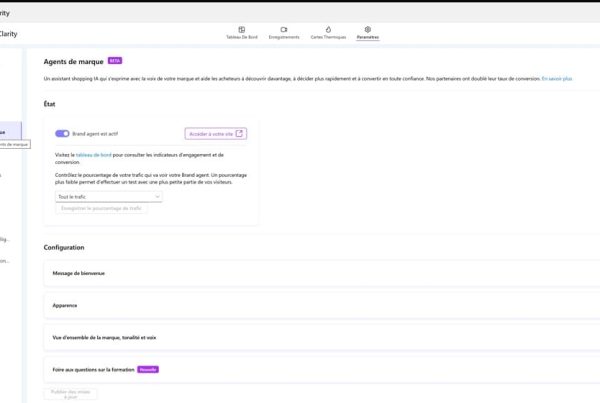
- Microsoft Clarity — session recordings and heatmaps, free with no volume cap
- GA4 — engagement rate, average duration and journeys by device type
The gap sits elsewhere. None of these tools tells you whether ChatGPT or Perplexity cite your site. Traffic from assistants shows up partially in GA4 as a referrer, but a generated answer mentioning your brand without a clickable link produces no measurable session. You can gain awareness without seeing it in any report.
Disclosure: I am a co-founder of Cockpyt AI. The tool queries ChatGPT, Perplexity, Gemini and Claude weekly on your business queries and reports the brands cited. The manual method described above works too, it simply takes time.
SXO: new discipline or marketing packaging?
SXO (Search Experience Optimization) describes the combination of search optimisation and user experience. The term is useful for selling a service. It describes no new practice.
User experience has been part of my audits since 2018, alongside technical work, content and links. Renaming an existing pillar does not create a discipline. A consultant who delivers an SEO audit without checking the mobile version or load time is doing the job badly, whatever name appears on the invoice.
What genuinely changed in 2026 fits in one sentence: a third channel appeared, with its own technical requirements. SXO does not cover it. Optimising the experience for Google and for the visitor guarantees nothing about your presence in answer engines, which depends first on the readability of your raw HTML. That is a separate task, overlapping UX on content structure and diverging from it on technical rendering.
Frequently asked questions about UX and SEO
What is the difference between an SEO consultant and a UX designer?
The UX designer shapes the journey and the interface from user needs, working through testing and wireframes. The SEO consultant optimises how discoverable those pages are to search engines. The two roles overlap on information architecture and performance, and diverge on everything else.
Is a fast site enough to rank well?
No. Speed is a tiebreaker between pages of comparable quality, not a standalone ranking lever. An instant site with irrelevant content ranks for nothing. Performance becomes decisive when several pages answer the search intent equally well.
Is content placed in an accordion indexed?
By Google, yes, provided it is present in the source code on load. By AI crawlers, only in that same case. If the content loads via JavaScript on click, it is reliably indexed by neither. The solution is to use a native HTML accordion.
Should the design be rebuilt before working on SEO?
Rarely. A visual redesign without revisiting content structure and URLs often produces a traffic loss with no conversion gain. The efficient order is to identify the pages already generating revenue, fix their measurable UX constraints, then consider the full rebuild.
How long before a UX fix shows an effect?
Core Web Vitals rely on field data collected over a rolling 28-day window. A fix deployed today takes about a month to be fully reflected in Search Console. The effect on positions, where there is one, comes after that.
How do I know whether an AI cites my site?
The manual method is to ask ChatGPT, Perplexity and Gemini the questions your prospects ask, then note whether your brand appears and in which position. Repeated weekly across a dozen queries, it gives a reliable trend. A tracking tool automates that collection and adds competitive comparison.
Florian Zorgnotti, SEO consultant in Nice since 2016.
Sources
- Google Search Central, “Introducing INP to Core Web Vitals”, updated 12 March 2024 — FID replaced by INP. developers.google.com
- web.dev (Chrome team), “Interaction to Next Paint is officially a Core Web Vital”, 12 March 2024 — FID deprecation and INP thresholds. web.dev
- Vercel & MERJ, “The rise of the AI crawler”, 2024 — analysis of real AI crawler traffic: none render JavaScript. vercel.com