Key takeaways
- The useful difference between on-page and technical is not theoretical: on-page is fixed alone from the back office, technical usually requires server access or a developer.
- Not every criterion carries the same weight: an indexing block cancels out the work done on fifty tags. Fix in this order: blockers, structural, finishing touches.
- One new technical criterion escapes most audits: JavaScript rendering, which Googlebot executes and AI crawlers ignore.
- Foundations (HTTPS, URL structure, performance) are checked once then monitored — they are not reworked every month.
Technical on-page SEO covers the internal optimisations that determine whether a search engine can crawl, understand and display your pages. Twelve criteria are enough, provided you handle them in the right order.
On-page SEO and technical SEO: what is the concrete difference?
On-page SEO covers what you change from your back office without outside help: headings, content, tags, internal links. Technical SEO covers how the site is served and rendered: indexing, crawling, performance, code. The boundary is not about vocabulary or difficulty, but about one operational question.
That question is the time to fix. Rewriting a title tag takes two minutes and depends on nobody. Fixing broken JavaScript rendering requires a developer, a staging review and a deployment. On an action plan, the two are not scheduled the same way, and that is the only reason the distinction is worth making.
CMS platforms blurred that line. On WordPress, an SEO plugin exposes indexing, canonical and sitemap settings that once belonged to the server. Part of the technical layer moved into the admin interface, which explains why both terms now appear together in a single query.
In my view, the on-page versus technical classification mostly interests consultants talking to each other. A business owner wants to know what they can fix themselves this week and what needs a budget. That is the reading I use in my action plans, and it produces sharper decisions than a taxonomy debate.
Where to start? The 12 criteria ranked by impact
Three priority tiers govern the order of fixes. Blocking criteria prevent your page from existing in results. Structural criteria determine how it is understood and ranked. Foundations are checked once then monitored.
The most common mistake is polishing details before clearing blockers. Optimising fifty title tags on pages Google does not index produces nothing. The table below shows the order I apply in audits.
| Tier | Criterion | Effort | Impact | Who fixes it |
|---|---|---|---|---|
| Blocking | Indexing | Low | Major | You |
| Crawl (robots.txt, sitemap) | Low | Major | You | |
| JavaScript rendering | High | Major | Developer | |
| Response codes (301, 404) | Medium | Medium | You | |
| Structural | Title tag | Low | High | You |
| Heading tags | Low | High | You | |
| Internal linking | Medium | High | You | |
| Structured data | Medium | Medium | You or developer | |
| Meta description | Low | Low | You | |
| Foundation | HTTPS | Low | Major if missing | Host |
| URL structure | High if migrating | Low | You | |
| Core Web Vitals | High | Medium | Developer |
The impact column reads relative to a site that already works. On a new site, everything is major. On an existing site that has plateaued, the cause almost always sits in the first section of the table.
The 4 blocking technical criteria
These four points determine whether your pages exist in results at all. No editorial work compensates for their failure.
1. Indexing: are your pages actually in the index?
The Page indexing report in Search Console, previously named Coverage, answers in a minute. It sorts your URLs into indexed and not indexed, with the exact reason for each exclusion.
Two symmetrical errors show up in nearly every audit. Pages with no search value end up indexed — legal notices, thank-you pages, empty category archives — diluting the overall evaluation of the site. And strategic pages stay out of the index, often because of a noindex tag left behind after a redesign or a misdirected canonical.
The check takes five minutes a month. The fix, when it involves a commercial page, produces the fastest result in this entire checklist.
2. Crawling: robots.txt and sitemap
The robots.txt file controls crawling, not indexing. This is the most widespread confusion in the field and it produces absurd situations: a page blocked in robots.txt can still appear in results, without a description, because Google knows its URL from external links but cannot read its content. To prevent indexing, the noindex tag is the right tool, and it requires crawling to remain allowed.
The XML sitemap lists the URLs you want crawled. Its usefulness grows with volume: marginal below thirty pages, decisive beyond a few thousand. On WordPress, SEO plugins generate and maintain it automatically.
3. JavaScript rendering: the criterion nobody tests
Googlebot executes JavaScript, answer engine crawlers do not. The analysis Vercel ran with MERJ on real crawler traffic concludes that none of the major AI crawlers render JavaScript. GPTBot downloads JavaScript files in roughly 11.5% of its requests without executing them, ClaudeBot in nearly 24% of cases with the same outcome.
The consequence is direct for any site whose main content loads client-side: it can be perfectly indexed by Google and remain entirely blank for ChatGPT or Perplexity. One channel works, the other does not, and no report flags it.
The test takes thirty seconds. View the page source with your browser shortcut, not the element inspector, then search for a sentence from your main content. If it appears, every crawler sees it. If it only shows in the inspector, it is generated in JavaScript and stays invisible to AI crawlers.
4. Response codes: 200, 301, 404
The real issue is not a penalty, there is none. It is wasted crawl resources and friction for the visitor.
- Code 200 — the page responds normally. This is the expected state of every internal link.
- Code 301 — permanent redirect. An internal link pointing to a redirect works, but sends the crawler through an unnecessary hop. At volume, this spends crawl resources on detours rather than on your new pages.
- Code 404 — page does not exist. An isolated 404 is normal and Google handles it without difficulty. An internal link structure riddled with 404s signals a poorly maintained site and drives visitors away.
I find broken links in nearly every audit I run, including on otherwise well-kept sites. The cause is almost always the same: a URL changed without updating the links pointing to it. A crawl with Screaming Frog surfaces the full list in minutes.
The 5 on-page criteria to check on every page
These five points are worked page by page, with no technical dependency. Each has a dedicated guide on this blog; the summary below covers the essentials and what changed by 2026.
5. The title tag
The title remains the strongest on-page signal. Put the main keyword at the start, keep every title unique across the site, write to earn the click rather than to stack terms.
What changed: Google frequently rewrites the titles shown in results, pulling from your H1 or your content when it judges the title poorly matched to the query. A well-written title still matters — it serves as a relevance signal even when the display differs. The objective shifted from controlling the display to sending a clear signal.
6. The meta description
The meta description does not influence rankings. It affects click-through rate, which is reason enough to write it properly on your commercial pages.
The display limit is measured in pixels, not characters, and varies between mobile and desktop. A description around 150 to 160 characters remains a practical benchmark. Google often rewrites it from page content when an extract answers the query better. On a high-volume site, concentrate the effort on pages that convert.
7. Heading tags
H1 through H6 describe the logical structure of your page. One H1 per page, H2s for main sections, H3s for their subdivisions, with no skipped levels.
Their role has broadened. Beyond comprehension by Googlebot, heading hierarchy determines how your page is split into self-contained passages, and therefore whether an answer engine can extract a citable excerpt. A page without H2s offers few entry points to generative AI.
8. Internal linking
Every page should receive links from other pages on the site. An orphaned URL is poorly discovered and receives little internal authority. Internal linking also reduces click depth, which drives how often crawlers pass through.
Descriptive anchors beat generic formulas: “internal linking guide” carries information that “click here” does not. Place links in the body copy rather than in the footer — position counts.
9. Structured data
JSON-LD markup explicitly describes the nature of your page and your entity: article, product, frequently asked question, organisation, person. Absent from most technical checklists, it is nonetheless a direct lever.
Two distinct benefits. Eligibility for rich results in Google, which improves visibility without changing position. And clarification of your entity for systems building knowledge graphs, which overlaps directly with the attribution mechanisms used by answer engines.
On WordPress, SEO plugins generate basic markup. More specific schemas, notably FAQPage and HowTo, require manual work and should be validated with Google’s rich results test before publishing.
Quick page-by-page check:
- One H1 tag only, unique across the site
- A unique title with the main keyword at the start
- At least two inbound and two outbound internal links
- No skipped levels in the heading hierarchy
- Valid JSON-LD markup, tested before going live
The 3 foundations to check once, then monitor
These three criteria are handled at launch or during a migration. They are not reworked monthly, but their failure is expensive.
10. HTTPS
Secure protocol has been standard for years, and its absence is now the exception. The watch point comes after a migration or a change of host: mixed content, expired certificate, incomplete HTTP to HTTPS redirects. A check after every server intervention is enough.
11. URL structure and stability
Stability outweighs optimisation. A short, readable URL containing the keyword brings a marginal gain; a URL changed without a clean redirect destroys the accumulated history. Avoid accented characters, underscores and dates in permalinks.
The practical consequence: never rename a live URL for cosmetic reasons. If the change is necessary, a 301 redirect and an update of every internal link pointing to the old address are mandatory.
12. Core Web Vitals
Three metrics measure the loading experience: LCP under 2.5 seconds for the largest visible element, INP under 200 milliseconds for responsiveness to interactions, and CLS under 0.1 for visual stability. Google replaced the former FID with INP on 12 March 2024, stating the change addressed the limitations of FID, which only measured the first interaction.
Field data in Search Console takes precedence over the PageSpeed Insights lab score. On WordPress, INP degrades mainly through accumulated third-party scripts and plugins saturating the main thread.
Does technical SEO change with answer engines?
The fundamentals do not move. A page unreadable to Googlebot is unreadable to GPTBot, and the criteria for indexing, crawling and structure serve both channels without modification.
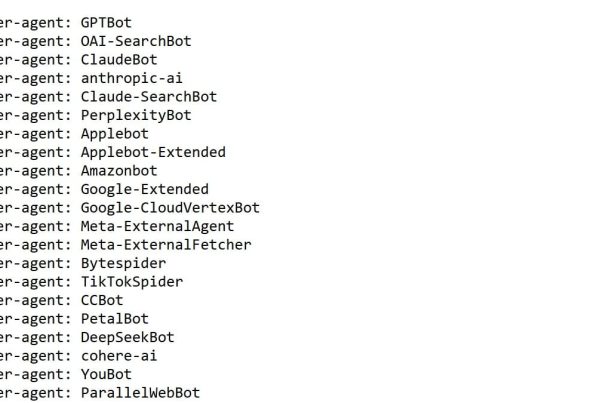
Three points are added. The first concerns directives aimed at AI crawlers in robots.txt: GPTBot, ClaudeBot, PerplexityBot and Google-Extended declare themselves separately, and a block inherited from a server configuration or a firewall can exclude you without your knowledge. The second is raw HTML readability, covered above. The third is extractable structure: self-contained sections opening on a direct answer get cited, a continuous wall of text does not.
In my view, the llms.txt file does not deserve your time today. This format, proposed to guide models toward your content, is not officially recognised by any major answer engine as of now. Creating it costs nothing, but prioritising it over a JavaScript rendering or indexing problem amounts to decorating a facade whose door is locked. I will revisit this position if official adoption arrives.
Disclosure: I am a co-founder of Cockpyt AI. The tool queries ChatGPT, Perplexity, Gemini and Claude weekly on your business queries and reports the brands cited. The manual check described above remains possible, it simply takes time.
Frequently asked questions about technical on-page SEO
What is the difference between on-page SEO and technical SEO?
On-page SEO covers what you change from your back office: headings, content, tags, internal links. Technical SEO concerns how the site is served and rendered: indexing, crawling, performance, code. The useful distinction is the time to fix, not the difficulty.
Do you need a developer for technical SEO?
Not for most criteria. Indexing, robots.txt, sitemap, internal linking and tags are all managed from WordPress with an SEO plugin. A developer becomes necessary for JavaScript rendering, INP optimisation and work on the theme or server.
How often should a technical audit be repeated?
A full audit once a year is enough on a stable site, alongside a monthly indexing check in Search Console. A redesign, a migration or a change of host justify an immediate audit — those are the moments when technical regressions appear.
Is technical SEO enough to rank well?
No. Technical work removes obstacles, it does not create relevance. A technically flawless site with no content matching a search intent ranks for nothing. Technical quality conditions the rest without replacing it.
How long before a technical fix shows an effect?
An indexing fix shows within days after requesting a recrawl. Core Web Vitals rely on a rolling 28-day window of field data, so allow a month. Structural and internal linking fixes act gradually over several weeks.
Should AI crawlers be blocked in robots.txt?
The answer depends on your model. Blocking protects your content from training, at the cost of any chance of being cited as a source. Allowing exposes the content and opens up visibility. For a consulting or service business, citation is generally worth more than protection. For a publisher living off its content, the trade-off runs the other way.
Florian Zorgnotti, SEO consultant in Nice since 2016.
Sources
- Google Search Central, “Introducing INP to Core Web Vitals”, updated 12 March 2024 — FID replaced by INP. developers.google.com
- web.dev (Chrome team), “Interaction to Next Paint is officially a Core Web Vital”, 12 March 2024 — FID deprecation and Core Web Vitals thresholds. web.dev
- Vercel & MERJ, “The rise of the AI crawler”, 2024 — analysis of real AI crawler traffic: none render JavaScript. vercel.com