Key takeaways: Google works through three sequential steps, crawling, indexing and ranking, each controllable with its own tools (robots.txt, noindex and canonical tags, work on the 4 SEO pillars), and indexing a page typically takes three days or more according to Google itself, a delay that grows if these steps are poorly managed.
Google works through three steps for search: crawling, indexing and ranking. Understanding this mechanism is the prerequisite to any optimisation, before working on a single keyword.
Does ChatGPT recommend your brand?Measure your presence and identify the brands cited in your place. No credit card required.
The 3 steps of how Google works
Before working on a single ranking criterion, you need to know what Google actually does with a web page. Three steps follow one another, in this order, and none can be skipped.
Step 1: crawling
Crawling refers to a page being analysed by Google’s bots, also called spiders. When a page goes live, these bots start from an already known page and follow its links to discover the site’s other pages, one by one.
Without a link leading to it, a page has little chance of being discovered this way. This is why an orphan page, with no internal link pointing to it, often stays off Google’s radar, even if it technically exists on the server.
Step 2: indexing
Once crawled, each page is evaluated against Google’s quality criteria. If it passes, its content is copied and stored in the index, the database Google queries to answer searches. An indexed page becomes visible in the search engine, a non-indexed page stays invisible even if it was perfectly crawled.
This is a step worth monitoring regularly in Search Console, since indexing errors happen regularly with no link to actual content quality: a misconfigured tag, a misdirected canonical, or simple processing delay on Google’s side.
Step 3: ranking
Ranking follows almost immediately after indexing. Google positions each indexed page based on the query typed by the user, the site’s overall SEO strength, competition on the topic, and several hundred combined criteria.
This step takes up the most time in SEO work, because it has no ceiling: a page can always improve, whereas crawling and indexing are binary states, a page is either indexed or it isn’t.
Controlling and optimising crawling
Google’s bots generally start from the oldest page they know to discover the rest of a site, often the homepage without this being an absolute rule. From that starting point, they follow links to map the entire site.
This mechanism explains why every page should receive at least one link from another page on the site. In practice, aiming for several relevant inbound links per page reduces the risk of it staying invisible to bots, without this being a strict rule imposed by Google.
Crawling is controlled through the robots.txt file, a text file placed at the root of the site. The Disallow directive tells bots which directories or pages not to explore. A common use case is blocking the URLs generated by an online store’s filters, which create thousands of near-identical variants of the same product page:
User-agent: *
Disallow: /*?filter=
Disallow: /admin/
Controlling crawling through robots.txt is mostly useful on large sites. According to Google Search Central’s official documentation on crawl budget management, Google allocates crawl resources based on popularity, perceived value, and how quickly your server can respond. A small showcase site generally has no reason to restrict crawling.
Three levers optimise this step without touching robots.txt:
- Internal linking: relevant links between pages, with no broken links, ease navigation for bots as much as for visitors
- Click depth: a page buried too deep risks never being reached by bots during the limited time they spend on each pass
- Server response time: a slow site reduces the number of pages bots can analyse in a single pass
Controlling and optimising indexing
In most cases, a crawled page ends up indexed. The real question is which pages actually deserve to be indexed, and which add nothing to the site’s SEO.
Google evaluates a site’s overall quality from the average quality of its indexed pages, somewhat like a school grade point average results from each subject’s grade. A low-value page, sitting in the index without ever receiving a relevant search, drags this average down. This is typically the case for legal notice or terms of service pages: nobody searches “legal notice + your company name” on Google, and indexing them brings no traffic in exchange for a potential drag on the site’s overall quality average.
In my view, most sites would benefit from deliberately deindexing their purely legal or administrative pages rather than letting them silently pollute their overall evaluation. It’s a ten-minute setting for an effect that far exceeds the time invested.
Two tools control this step:
- The noindex tag: added in seconds via an SEO plugin like Yoast, it explicitly tells Google not to index a page while still allowing it to be crawled
- The canonical tag: across a set of very similar pages, it designates the original version to index and avoids duplicate content, a common technique on e-commerce sites
Ranking: the 4 pillars that determine position
Ranking plays out across hundreds of criteria, grouped into 4 major pillars of search optimisation: technical, user experience, content and popularity. This is the work that takes up most of an SEO consultant’s time, precisely because it has no ceiling unlike crawling and indexing.
Do AI crawlers follow the same 3 steps?
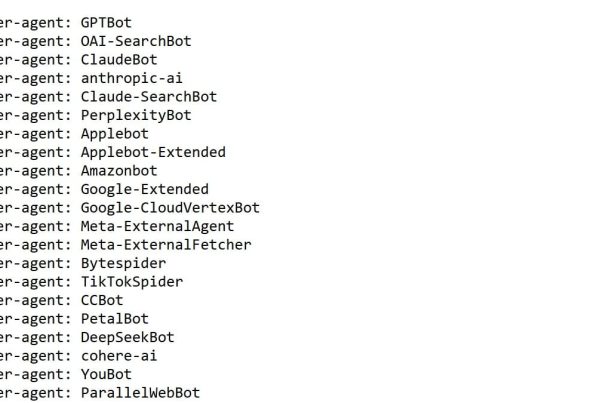
The principle stays the same, but the bots change, and their rules with them. An answer engine like ChatGPT or Perplexity has its own crawlers, GPTBot for OpenAI, ClaudeBot for Anthropic, which crawl the web independently of Googlebot.
The difference lies in technical rendering. Googlebot executes the JavaScript on your pages before analysing them. The analysis Vercel ran with MERJ on real crawler traffic shows that none of the major AI crawlers render JavaScript: GPTBot downloads JavaScript files in roughly 11.5% of its requests without ever executing them, ClaudeBot in nearly 24% of cases with the same outcome.
In practice, a page whose main content loads via JavaScript can be perfectly crawled and indexed by Google, while remaining an empty page for these AI bots. Crawling succeeds on one side and fails silently on the other, with no report flagging it directly.
Disclosure: I am a co-founder of Cockpyt AI, a tool that queries ChatGPT, Perplexity, Gemini and Claude weekly to check whether your brand is cited.
Frequently asked questions
How do you index a new web page quickly?
Two solutions exist. A backlink from an already indexed, active site leads Google to follow the link and discover your page quickly, but this is the most costly technique to obtain. More simply, the URL Inspection tool in Search Console lets you submit a page to Google directly. According to Google, indexing a page typically takes three days or more for most sites, a delay that grows if the 3 steps of how Google works aren’t well managed.
How do you remove a page from Google’s index?
Two actions are needed, in order. First, request removal through Search Console, under Index then Removals. Second, add a noindex tag to the page or block it via robots.txt to prevent Google from reindexing it on the next pass. Without this second step, the page reappears in the index on the next crawl.
How do you know how many pages of your site are indexed?
The site:yourdomain.com search in Google gives a quick order of magnitude, but remains approximate. The Page Indexing report in Search Console offers a reliable count, with a breakdown of valid pages and excluded ones, along with the reason for each exclusion.
Should you block crawling on every non-strategic page?
No, not systematically. Blocking crawling via robots.txt also prevents Google from knowing whether a page’s content or status has changed. For a page you simply want to exclude from search without disrupting its discovery, a noindex tag is generally preferable to blocking crawl access.
Florian Zorgnotti, SEO consultant in Nice since 2016.
Sources
- Google Search Central, “Crawl Budget Management for Large Sites” — crawl budget allocation and typical indexing delays. developers.google.com
- Vercel & MERJ, “The rise of the AI crawler”, 2024 — analysis of real AI crawler traffic: none render JavaScript. vercel.com